Home»Support»1-Click Duplicate Delete for Outlook»Help + FAQWebsite updated: Apr 25, 2024
Compatible
 | to Windows 11, 10, 8.1, 7, Vista, 2003 Outlook 2021, 2019, 2016, 2013, 2010, 2007, 2003, 2000 Intel/AMD, not ARM, not One/Monarch Exchange, Microsoft 365 (Office 365) |
Customer Rating
564 ratings for 1-Click Duplicate Delete for Outlook with an average of 4.57:

References
Boeing, IBM, Intel, Microsoft & NASA are using Easy2Sync.
More >
“Love the program does pretty much exactly what it says on the tin and actually works unlike several others that I have tried.”
Haydon Carter
More >
More >
“Love the program does pretty much exactly what it says on the tin and actually works unlike several others that I have tried.”
Haydon Carter
More >

FAQ - Typical questions
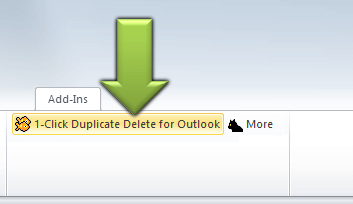
How do I delete duplicates in Outlook?1. In Outlook click on the tab 'Add-Ins'.
2. Click on button '1-Click Duplicate Delete for Outlook'.
3. If necessary repeat this until the program reports 'No duplicates found'.
How do I merge contacts?
This is done automatically. No action on your side is necessary for this.
Why do I have duplicates?
Duplicates are created for many reasons. Incorrect configuration can cause e-mails to be sent or received twice. Or a bad sync regards objects as different and copies them altough they already exist.
How do I bring contacts together?
This happens automatically during the duplicate search. In advanced mode, you can disable this function if you wish.
Why do I have duplicate emails?
Often the e-mails are not exactly identical, but have small differences. For example, incorrectly converted special characters, different IDs for links in newsletters or changed version numbers in the notice text of an anti-virus program. 1-Click Duplicate Delete for Outlook automatically detects all this.
Why aren't my duplicates found?
In order to make better confirmation requests, the program searches several times. Just repeat the scan. If the duplicates are still not found, use the menu item 'More > 2 compare objects'.
How do I remove duplicates from a folder?
In Outlook go to the folder with the duplicates and click on the button "1-Click Duplicate Delete for Outlook". Done.
How do I remove duplicates from folder and its subfolders?
In Outlook go to the folder with the duplicates and click on the button "More" (next "1-Click Duplicate Delete for Outlook"). A wizard will guide you.
How do I remove duplicates from the entire PST-File?
In Outlook go to the topmost folder in the folder tree ("Outlook Today") and click on the button "1-Click Duplicate Delete for Outlook". Done.
Can I remove the duplicates in multiple PST files?
If you have multiple PST files, you can remove the duplicates in each of them separetely. But it's currently not possible to check several of them at once.
What are the limitations of the demo version?
The demo version allows you to scan an unlimited amount of data and then remove 3x up to 20 duplicates thereof.
Is Outlook 2021 supported?
Yes. The Outlook versions 2021 (32+64 bit Intel/AMD), 2019 (32+64 bit Intel/AMD), 2016 (32+64 bit Intel/AMD), 2013 (32+64 bit Intel/AMD), 2010 (32+64 bit Intel/AMD), 2007, 2003, XP, 2002, 2000 are supported.
Exchange and Microsoft 365 (Outlook 365) are also supported.
Not supported are ARM and Outlook One/Monarch
Can 1CDDO recognize duplicates in the Business Contact Manager?
Sorry, no, because BCM doesn't store the data in Outlook.
The Outlook toolbar doesn't appear!
Please use the "Repair" function of the "Helper program" (Start > Programs > 1-Click...).
If that doesn't help and the add-in is registered+active, but the "Add-in" tab still doesn't appear, please check:
File > Options > Customize ribbon > Enable the entry "Add-Ins" on the right
Why aren't my duplicates recognized?
If the software doesn't recognize them, then it's virtually 100% safe to say that they aren't duplicates. They are only similar. But you can delete them nevertheless. For the right settings, just contact us, we're here to help (or use this detailed how-to).
How are contacts merged?
First, contacts are broken down into their individual pieces of information. Identical pieces remain, missing ones are copied. If the pieces contradict each other, then the newer one is kept and the older one as appended in brackets behind it. This way nothing gets lost.
How can I move the toolbar icons? [Only Outlook 2007 or lower]
You can easily move the icons into the Outlook main toolbar. Here's how.
See also
· General questions on purchase, download, registration and upgrade.· Purchase questions
Or search the entire FAQ:
Sync Outlook ·
Synchronize Files ·
Sitemap ·
PAD ·
EULA · Uninstall · Mobile version ·
© 1999-2024 ITSTH